 Move your Qi
Get your Qi flowing – right in the middle of your workday.
Move your Qi reminds you on your schedule to take short movement breaks from Qigong and Traditional Chinese Medicine. 2–3 minutes, animated guidance, all standing right next to your desk.
Coming soon for iPhone and Android · Free basic version
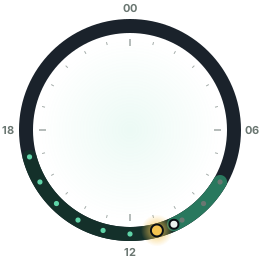
“Prolonged sitting injures the flesh.”
Short activity breaks every 30 minutes markedly lower blood sugar and insulin peaks after meals (Dempsey et al., Diabetes Care 2016).
The Eight Brocades (Bā Duàn Jǐn) are among the oldest and best-studied Qigong sequences.
Lymph has no heart of its own – it flows through muscle movement, the calf pump and deep breathing.
Get reminded – and join in right away.
Other apps just tell you to stand up. Move your Qi also shows you what good you can do in two minutes.
Reminders on your schedule
Pick weekdays, time window and interval – e.g. Mon–Fri from 8 am to 5 pm every hour, every two hours at the weekend.
Animated exercises
An animated figure demonstrates every exercise, with step-by-step instructions and breathing cues.
Guided countdown
5-second preview, then 30 or 60 seconds of practice. A gong starts, soft ticking announces the end.
Programs & custom routines
Desk Reset, Lymph Flow, Meridian Tapping, Energy Boost – or put together your own favourite exercises.
Singing bowl, not a beep
Choose a reminder sound for each schedule: singing bowl, gong, tingsha, chimes, wood block or silent.
In 12 languages
English, German, Chinese, Hindi, Spanish, French, Arabic, Bengali, Portuguese, Russian, Urdu and Indonesian.
From Qigong, Tai Chi and Daoyin.
Each exercise takes 30–60 seconds and explains its TCM background – from shaking and the Eight Brocades to meridian tapping.
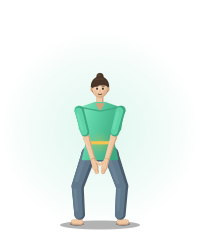 The Wood Chopper
Release stagnation
The Wood Chopper
Release stagnation
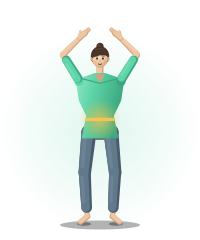 Holding Up the Sky
Eight Brocades
Holding Up the Sky
Eight Brocades
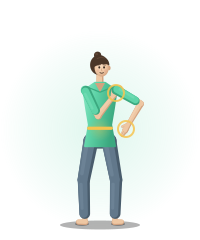 Twist & Tap
Spine & Wei Qi
Twist & Tap
Spine & Wei Qi
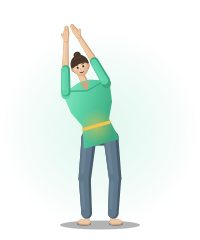 Open & Side Stretch
Flanks & Liver Qi
Open & Side Stretch
Flanks & Liver Qi
Home exercises that actually get done.
Your patients know they should move more. Move your Qi reminds them during their day – with exercises that fit your treatment.
- Complements your treatment – Qigong, meridian tapping and breathing exercises between appointments.
- Explained responsibly – each exercise with TCM background, safety notes and no healing promises.
- No account needed – schedules and statistics stay on your patient’s device. Completely ad-free with Premium.
- For every age – gentle standing exercises, and the basic version is free.
Free practice kit
For practices that would like to recommend Move your Qi to their patients:
- Premium for you to try out – free for one year.
- Practice code for your patients: 3 months of Premium for free.
- Flyer & display with QR code for waiting room and reception (PDF).
- Your feedback goes straight into new exercises and programs.
Just send a short email – we’ll get back to you personally.
Start for free. Go Premium when you want more.
Reminders and three exercises are free forever. Premium unlocks everything.
Free
- Reminders on your own schedule
- All reminder sounds
- 3 exercises & the “Quick Start” program
- 2 ad-free breaks a day, then short ads
Premium yearly
- No ads
- All 21 animated exercises
- All 7 programs & custom routines
- Multiple schedules & custom intervals
- Just €1.67 per month
Monthly or lifetime
- Cancel anytime
- or €49.99 once – Premium forever
Frequently asked questions
Do I need any Qigong experience?
No. Every exercise is demonstrated by an animation and explained step by step. The movements are deliberately simple and take only 30–60 seconds.
Can I do the exercises at the office?
Yes. Every exercise needs little more space than one step next to your desk, and the “Neck & Shoulders” program is made for long screen days.
Does the app replace treatment?
No. Move your Qi does not replace medical or therapeutic advice. The TCM descriptions are traditional explanatory models. If you have complaints, practise gently or seek medical advice.
What happens to my data?
The app needs no account. Schedules, routines and statistics are stored only on your device. In the free version, two short Google AdMob ads play from the third break of the day, personalized only with consent. Premium is ad-free. See the privacy policy.
Do reminders work when the app is closed?
Yes. On iPhone and Android the app schedules local notifications – they arrive even without internet and with the app closed.